Overview
This article contains step-by-step instructions on how to associate a profit centre to a package plan.
This function enables users to set a default profit centre to the package plan so that all cardlines for package plan subscription charges related to this plan are included in the profit centre.
This setting will be overridden by profit centres associated directly to a customer's package subscription, service subscription or cardline. For more about the profit centre business rules and how the system applies profit centres, see this article.
Assign a Profit Centre to a Package Plan
To do this;
Log in to Cumulus
Go to Packages and Plans > Management
Find a package plan and open its record.
From the list of sub-tabs, click on the Profit Centre tab.
The following page will appear.
Any profit centres that have been assigned in the past, or are presently assigned, will appear in the table.
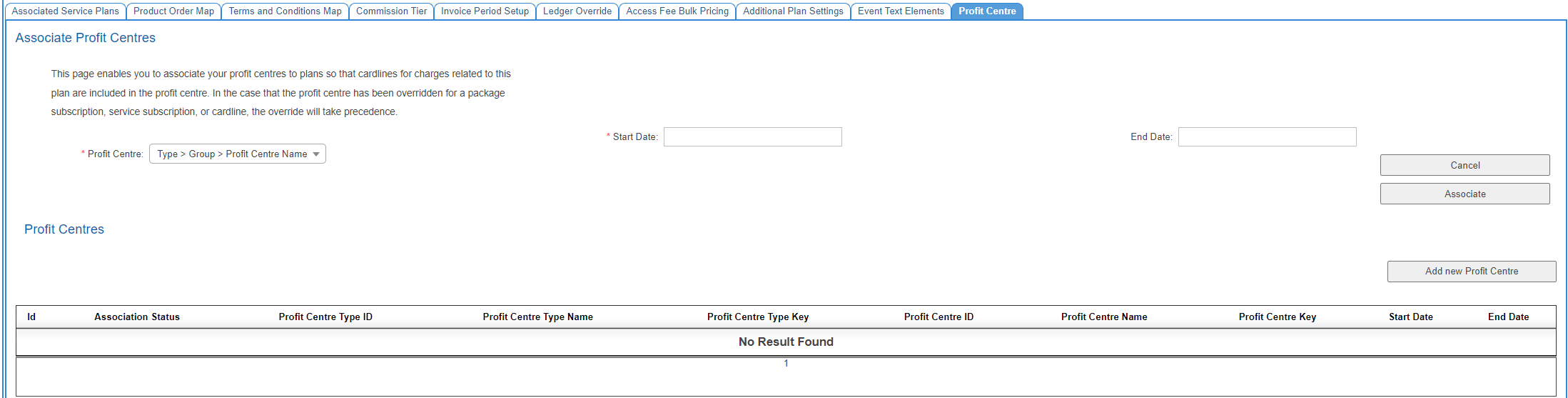
To associate a profit centre, select one from the dropdown list and choose a start and optional end date.
If users need to add a new profit centre, click the Add New Profit Centre button. Users will be taken to Nimbus where they can add a new profit centre (permissions required).
Choose a start date
If required, choose an end date.
Click the Associate button located on the right-hand side of the page.
The page will refresh with the associated profit center listed in the table.