Overview
This event is used to send a notification to the customer when a service provider has updated a service desk ticket via email or the end user portal.
Prerequisites
The service provider must meet the following prerequisites
- be subscribed to the service desk module
- have an end user portal with service desk ticketing capability enabled
- be subscribed to the Events module.
Licensing
This event is:
- a standard event
- included with a module or feature
- a standalone event available upon request (please contact your Account Manager)
Action Types
The event supports the following actions.
- Message
- SMS
- Log
- On Screen
Trigger
The event is triggered by a service provider updating a service desk ticket via Cumulus.
Specifically, when saving a new note, the following check-boxes must both be checked:
- Customer visible?
- Send this response to the customer (a file attachment will not get sent)
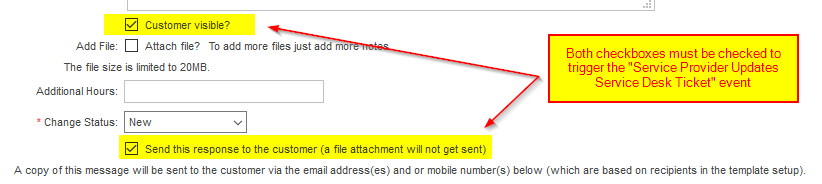
Notes
Recipient Selection
When creating an email template for this event type, please be aware of the Recipient you select.
This could allow an outbound notification email to be send to an email address that differs from the one attached to the contact that creates/updates a service desk ticket.
For example: The Primary Contact of an account responds to a service desk ticket via the end user portal. You have configured your email template to send notifications to an account's Billing Contact. The Primary Contact will not receive email notifications if they have a different email address to the Billing Contact (this is more common with business customers than it is for individuals).
Message Template Summary
When this event is triggered, the outgoing email will automatically prepend the email subject with the text [Queue Email Prefix|Service Request ID]. This is used by the Inbound Email functionality in order to add emailed customer comments to the same ticket.
For example: [SUP|123456] New Ticket Updated
Template Variables
- Service Request ID
- Summary
- Note Id
- Note Details
- Account Id
- Customer Name
- Customer Contact
- Primary Phone
- Mobile
- Queue
- Note Category
- Sub Category
- Status
- Urgency
No thresholds apply to this event.
Related Articles
Related Events
- Service Desk Inbound Email Auto Response (id: 1039)
- Service Provider Updates Service Desk Ticket (id: 1045)