Overview
This article explains the rules and functionality of the Profit Centre module and how profit centres can be stamped on a cardline or invoice item to be used for reporting in Emersion. There are no limits to the number of profit centres that can be active under a service provider account at any time.
Some Profit Centres features are found in Nimbus and some in Cumulus. Some, but not all features are provided in both applications. There are also separate permissions that apply in each application that must be configured.
The Profit Centre Home Page guides users on what permissions for each application may apply and which features are available in Cumulus, Nimbus or both.
Profit Centre Types and Groups
Profit Centre Groups are an optional way to group Profit Centre Types, and are the broadest way in which profit centre can be reported on.
Profit Centre Types are an optional way to group Profit Centres. Each Profit Centre Type can have multiple Profit Centres attached to it.
Service providers can use Profit Centres without creating any Profit Centre groups or types.
The below diagram explains the hierarchy of profit centre groups, profit centre types and profit centres:
Profit Centre Statuses
The following statuses apply to profit centre associations. These are not editable by users and determined by the system as per the rules in this article.
Status | Description |
|---|---|
| Pending | Configuration of the association has been finished. It is ready for a peer review and to be approved for use. |
| Active | The profit centre association is in use. |
| Grandfathered | This association is no longer longer active. The Effective From and Effective To dates are in the past. |
| Draft | The initial state for an association while set up and configuration is in progress. |
Keys
Profit Centre Groups, Profit Centre Types and Profit Centres can optionally be configured with its own unique key. This is a simple text field where users can enter a text-based reference number.
For example, this might be a profit centre code from an accounting system.
Inheritance Rules
Subscription Inheritance
Profit centres are automatically applied to services or service-based products based on a set of inheritance rules. This inheritance system looks at the lowest place in the hierarchy, beginning at the cardline, to obtain the correct value. If a profit centre cannot be attached to the cardline, the system will then search for a profit centre attached to the service, package or account (in that order). The system will look to the next highest level in the hierarchy until it reaches the top (account), and if no profit centre can be found then none will be applied.
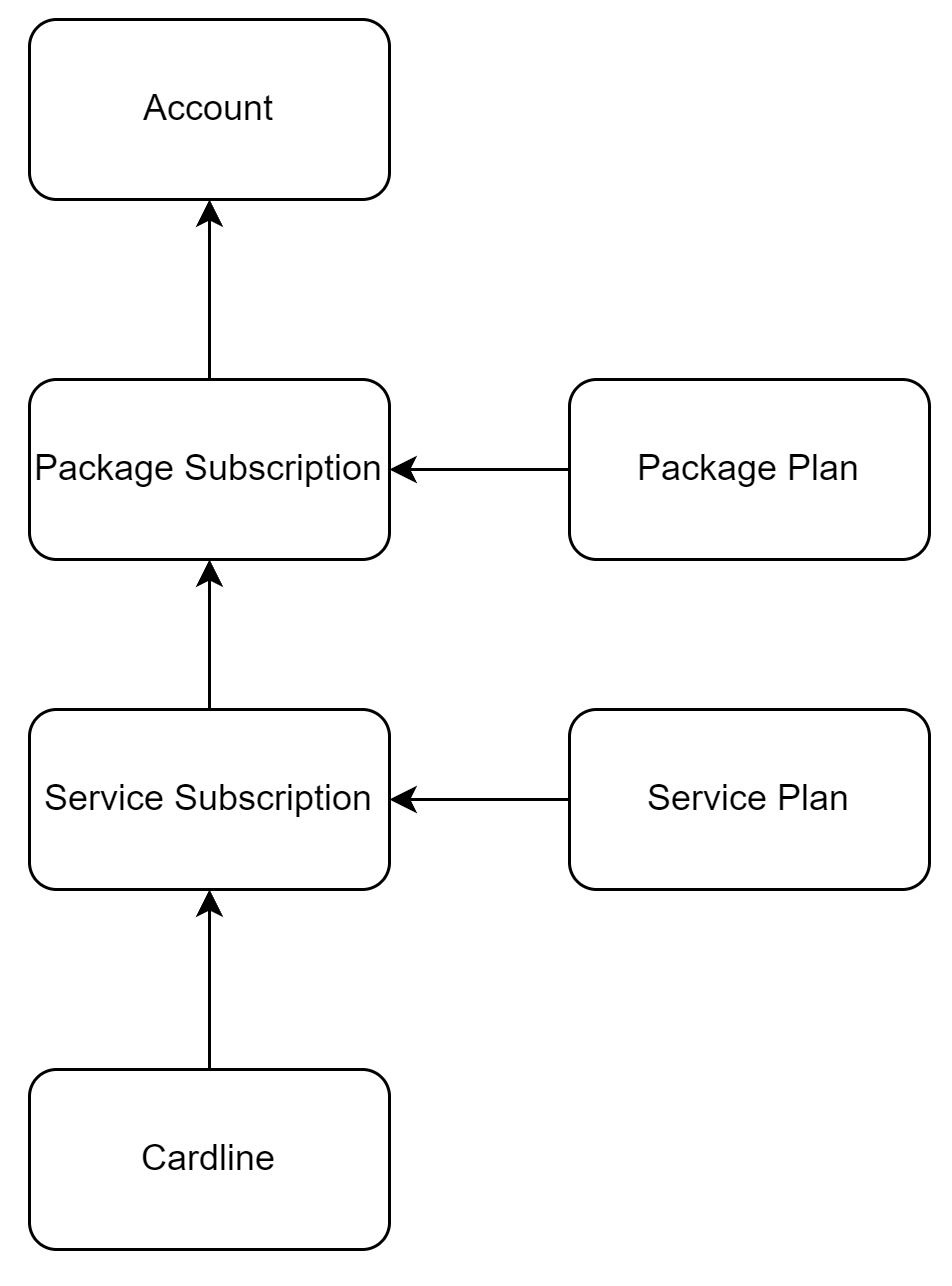
For package subscriptions, the profit centre associated with a package plan will be the default profit centre, unless this is overridden at the Package Subscription or Cardline level. Service subscriptions will retrieve their profit centre from the corresponding service plan association, it it exists.
If the package or service plan has no cost centre associated with it for the subscription to use, it will then use the profit centre attached to the account.
Product Inheritance
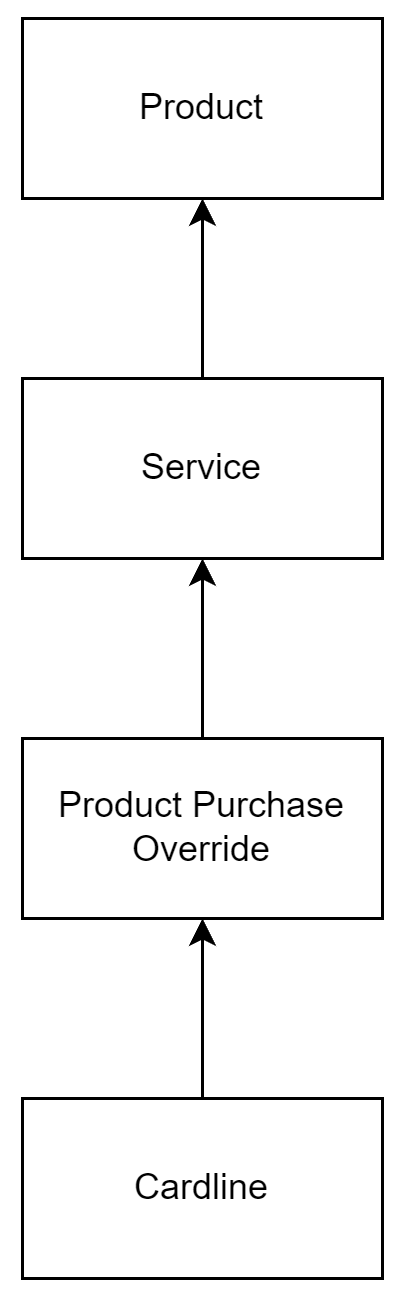
For products, Profit Centres will work independently and adopt their own inheritance scheme.
Product Purchases and Linked Services
If a service is linked to a product purchase, then the system will follow the hierarchy below to obtain the correct profit centre for the cardline.
Example Inheritance Scenarios
Since Emersion supports accounts with different configuration for plans and subscriptions, and profit centres can be set at multiple levels, the following case scenarios apply.
An account with a single package subscription containing a single service:
Inheritance rules as stated apply.
An account with a single package subscription containing multiple services (a bundle):
Condition: Account-level default is set and
| Condition | Profit Centre Applied |
|---|---|
| Profit centre is not set for the package subscription or service subscriptions | Account-level profit centre applies |
| Profit centre is not set for the service sub, or on the service plan but it is present on the package subscription/package plan | Package subscription / package plan profit centre applies |
| Profit centre is set for the package subscription/package plan and a single service plan/subscription, but not for others | For the service subscriptions that have a profit centre set, or where a profit centre against the service plan, use it For the services that do that have a profit centre set, get the profit centre from the package subscription or package plan |
| Profit centre is set for the package plan/subscription and present on multiple (or all) service subscriptions/service plans | Service subscription/service plan profit centre applies |
Condition: Account-level default is not set and
| Condition | Profit Centre Applied |
|---|---|
| Profit centre is not set for the package subscription or service subscriptions | No profit centre applies |
| Profit centre is not set for the service sub, or on the service plan but it is present on the package subscription/package plan | Package subscription / package plan profit centre applies |
| Profit centre is present for the package subscription / package plan and a single service subscription, but not others | For the service subscriptions that have a profit centre set, or where a profit centre against the service plan, use it For the services that do that have a profit centre set, get the profit centre from the package subscription or package plan |
| Profit centre is not present for the package subscription/package plan and present on multiple or all service subs/service plans | Service sub/service plan profit centre applies |
Profit Centres and Billing Objects
The following business rules apply to the associations between profit centres and their corresponding billing objects.
Profit Centre Rules
Any profit centre can be associated with a billing object. There is no need to "flag" which can be associated and which ones cannot be.
The Effective To date/time cannot be prior to the Effective From date/time. If the user attempts to define an Effective To date/time prior to the Effective From date/time, they receive the following error message: The Effective To date cannot be prior to the Effective From date.
Editing existing associations:
- When an association is in the past, - i.e. both the Effective From date/time and Effective To has passed, users cannot edit any data belonging to the association. It will only be read-only, regardless of the user's permissions.
- When an association is in the future, - i.e. The Effective From date/time is in the future - users can edit any information pertaining to it and can also delete it.
- When an association is current, The Effective From date/time is in the past, but the Effective To date/time is either in the future or not populated at all, then users can only edit the Effective To date/time field.
Deleting or removing an association is only possible when the association is future-dated, i.e. not in the past and not current.
Package and Service Subscriptions
Profit Centre associations cannot be created for subscriptions in a status of Aborted, Pending Prov Cancel, Pending Cancellation or Cancelled (i.e. Not Active or Preactive). The following error message will appear: Profit Centres can only be applied to Preactive and Active subscriptions.
The Effective From date/time cannot be prior to the package/service subscription activation date. If it is the following error message will appear: The Effective From Date cannot be before the subscription was activated.
If no Effective From date is provided and the service subscription is not Preactive, the following error message will appear: An Effective From date must be defined for active subscriptions.
If no Effective From time is provided, the system will set the time to 0:00hrs on the Effective From date, and 23:59hrs on the Effective To date.
If a package or service subscription is Preactive, then the user can define an association with no Effective From date/time, as the activation date may not be known. In these cases the system will need to set it when the service/package subscription is activated. The Effective From date/time = the subscription's activation date.
Package and Service Plans
Unless overridden at the package subscription, service subscription, or cardline levels, a profit centre associated with a package or service plan will be the default profit centre for a corresponding subscription.
The Effective From date/time cannot be prior to date that the package plan was Approved. If it is, the following message will appear: The Effective From date cannot be prior to the Approval date of the Plan.
If a package plan is in Draft or Pending, then the user can define an association with no Effective From date/time. In these cases the system will need to set it when the service or package plan is Approved. The Effective From date/time = the plan's approval date/time.
Products
The Effective From date/time cannot be prior to the date/time the product was created.
Unless overridden at the product purchase or cardline level, a profit centre associated with a product will be the defaulted profit centre for a corresponding product purchase.
Product Purchases
The Effective From date/time cannot be prior to the date/time of purchase.
Cardlines
The Effective From date/time cannot be prior to date/time that the cardline was generated. If it is, the following error message appears: The Effective From date cannot be prior to <cardline create date>.
Profit Centres and Migrations
When a subscription is migrated, the system will attach a profit centre based on the destination subscription. If a destination profit centre can't be found, the system will use the source subscription to determine the profit centre. If neither the destination nor source subscription has a set profit centre, standard inheritance rules on the destination side will be used.
The Effective From date/time will become the date that the migration is processed (i.e when the migrated services are activated).
Profit Centre History
To maintain a historical record of profit centres over time and determine the status of an association, Effective From and Effective To dates/times on profit centre associations is required.
The system will prevent users from having profit centre associations with overlapping date durations, which means that new associations cannot be created if they cover the same period as previous associations (up to the maximum allowed number of associations).
Examples
Valid - assuming max number of associations is 1
ID | Association Status | Service Plan ID | Service Plan Name | Profit Centre Type ID | Profit Centre Type Name | Profit Centre ID | Profit Centre Name | Effective From date | Effective To date |
|---|---|---|---|---|---|---|---|---|---|
| 00001 | Grandfathered | 12345 | Basic Plan | 00001 | Location | 10001 | Melbourne | 1/11/2021 | 15/11/2021 |
| 00002 | Active | 12345 | Basic Plan | 00001 | Location | 10002 | Sydney | 16/11/2021 | 31/12/2021 |
Invalid - assuming max number of associations is 1
This example creates an overlapping period as shown in red.
ID | Association Status | Service Plan ID | Service Plan Name | Profit Centre Type ID | Profit Centre Type Name | Profit Centre ID | Profit Centre Name | Effective From date | Effective To date |
|---|---|---|---|---|---|---|---|---|---|
| 00001 | Grandfathered | 12345 | Basic Plan | 00001 | Location | 10001 | Melbourne | 1/11/2021 | 15/11/2021 |
| 00002 | Active | 12345 | Basic Plan | 00001 | Location | 10001 | Melbourne | 10/11/2021 | 31/12/2021 |
Cardlines
When a cardline is allocated to an invoice by a user, the system will check for a profit centre. If none is found, the user will be prompted to link it to a service (assuming it is a subscription-based cardline and a service exists). If a profit centre is present as per the inheritance rules, it will use it.
If the profit centre is already set on package plan, service plan, package subscription or service subscription, the system will look this up and assign to the cardline at the time it's created. If no service is available, or the user does not want to link the cardline to a service (because it would be inappropriate to do so) the user can set the profit centre manually.