Overview
Emersion provides an address based SQ (designed around G-NAF) and service/location tracking management for service providers that supply NBN-like services, including the infrastructure itself such as site devices and port management.
This article is for service providers who want to populate the address-based service qualification ('SQ') tool with an available list of addresses and their service availability status. For any given address, the availability status will vary between service providers. In order to use the SQ tool, the service provider must have stored all addresses and their serviceability status. Once they are in the database, these addresses will be available for use by the address-based SQ tool.
Emersion does not have a database of every address in Australia (or elsewhere) that is ready to use for this purpose.
Licencing
This feature is available to subscribers of the following:
- Emersion Core
- Optional Modules (Infrastructure)
- Upon Request (please contact your Account Manager)
Preparing The Data for Import
Users will need the following data to create an import file.
The import template is a generic template that caters for all different types of addresses, with both long and short forms supported. Not all fields will be used for each address, therefore no address field is mandatory. Please pay very close attention to filling in this import sheet. Emersion data consultants will sight your data for technical compliance, not content accuracy. Emersion will not be held liable for correcting mistakes made due to data being provided to us that is discovered to be incorrect.
| Report ID | Report Name | Report Group |
|---|---|---|
| 1196 | Service Availability Descriptions | Reference |
| 968 | Address Reference Data | Reference |
| 863 | Service Type List | Reference |
Service Availability Descriptions
These are needed to populate the import template. If these existing descriptions are not fit for your purposes, service providers are welcome supply additional descriptions. Service availability descriptions need to be available in Emersion before importing addresses. An import template has been made available for this purpose.
Service availability descriptions is classified as global reference data. They will be able to be seen and used by other service providers if they are also using the address-based SQ when placing orders for the same service type.
Emersion reserves the right to refuse service availability descriptions that are too customer-specific or are unsuitable for use by other service providers
GNAF Addresses
Once you have confirmed that the service availability descriptions you need are in Emersion, proceed with preparing the address data, using the Address Reference Data report. It must be supplied in the required format.
Service Type List
This report will provide a list of service types.
Import Templates
If you need to import more than this, create multiple import files and process them one-by-one.
Download the service availability description import template
Download the GNAF addresses import template
Importing The Data
There is no support for service providers to load service availability descriptions or G-NAF addresses into Emersion via Cumulus. Once the data files have been prepared, a quote ticket must be raised via the service desk.
We provide a quote of 1 hour (with a time and materials cost) to import your addresses. The quote must be accepted in writing before work will commence.
This assumes a single iteration through the data import process as described below. If Emersion need to assist you with your data preparation, or we are required to attempt more than one import, further charges will apply. Please allow up to 14 days for your request to be processed once we have all the requirements. Estimated delivery dates can be subject to vary during busy times.
Data Import Process
Emersion will undertake the following procedure to import the data.
- Emersion will review the data you have provided to ensure it is technically compliant and is in a state ready for import. If the data is not ready to import, it will be returned back to you to correct and resubmit.
- Once the file passes, Emersion will import your data into a test environment and perform a sanity check.
- Emersion will then export this data from the database and return it back to you for validation.
- If the data needs correcting, please make a new version of the import sheet and submit it to Emersion via the ticket.
- If the data does not need correcting, provide written sign off. Emersion will not import data into Production without written sign off.
- Emersion will then load the data into the Production (Live) database and notify you.
Validating the Import
Bulk Import Validation
The system will parse the data for invalid formatting only. It cannot check for data accuracy. It is strongly recommended that you check the imported data to ensure that the import was accurately imported. To do this, divide your import records into groups of 20. Check a single record in each group. If an error is found, check each previous record for the group until you find the one that was imported incorrectly.
If you find an problem, you cannot roll back the import. You have two options should this occur:
- Manually correct the data.
- Request Emersion fix the errors for you.
Any request to correct imported data must be submitted via a ticket. Emersion will provide an estimate of the work and a quote. The quote must be approved and paid in advance before any restorative work commences.
Data Definitions
This section contains a list of the required fields and a definition of what the system considers as valid inputs.
Service Availability Descriptions
| Data field | Description | Mandatory? |
|---|---|---|
| CLASS_NUMBER | A numerical value that can be used to test for a pass or fail SQ result. E.g. If you consider your minimum serviceable class number as 4 - SQ fails are descriptions of class number 1, 2 and 3. The SQ will produce a pass if the address is class 4 or greater Note: You need to inform Emersion of your minimum serviceable class number such that an account attribute (SERVICE_AVAILABILITY_LEVEL) can be set. | Yes |
| DESCRIPTION | The service availability description to describe the serviceability of a location/address. | Yes |
| SERVICE_TYPE_ID | Service type ID applies if the description applies only to a single service type. In many cases, service types are used by multiple Service Providers. | Yes |
| SERVICEABLE | Just a simple flag to indicate a an availability description that you consider serviceable. Used in reporting. Enter 0 for No) or 1 for Yes where appropriate. | Yes |
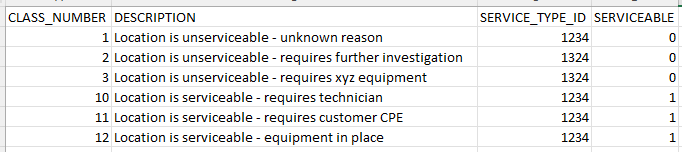
Service Availability Description Example
Consider the example whereby class number 10 is considered your minimum serviceable class number.
Anything below 10 would be considered unserviceable, whereas 10 and above is considered serviceable.
GNAF Addresses
 This is a customer-facing import and can be done by visiting Admin > Bulk Import > Carrier Location Availability
Alternatively, you can visit Services > Address to both export existing addresses and import data
| Data field | Description |
|---|---|
| EMERSION_ID | A unique key assigned by the Emersion database automatically. Leave this field empty |
| GNAF_PID | A unique key assigned by the Emersion database automatically. Leave this field empty |
| UNIT_NUMBER | Enter a numerical value in this field if the address has a unit number |
| UNIT_NUMBER | Enter a numerical value in this field if the address has a unit number |
| UNIT_TYPE_CODE | Refer to the Physical Address Reference Data report |
| LEVEL_NUMBER | Enter a numerical value in this field if the address has a level number |
| LEVEL_TYPE_CODE | Refer to the Physical Address Reference Data report |
| ADDRESS_SITE_NAME | Enter a text value in this field if the address has an address site name |
| ROAD_NUMBER_1 | Enter a numerical value in this field if the address has a street number (e.g. 285-289 Hope Road) |
| ROAD_NUMBER_2 | Enter a numerical value in this field if the address has a 2nd road number (e.g. 285-289 Hope Road) |
| LOT_NUMBER | Enter a numerical value in this field if the address has a lot number |
| PLAN_NUMBER | Enter a numerical value in this field if the address has a plan number |
| ROAD_NAME | Enter a text value in this field if the address has a road name |
| ROAD_SUFFIX_CODE | Refer to the Physical Address Reference Data report |
| ROAD_TYPE_CODE | Refer to the Physical Address Reference Data report |
| LOCALITY_NAME | Enter a text value in this field if the address has a locality name |
| STATE_TERRITORY_CODE | Refer to the Physical Address Reference Data report |
| HISTORICAL_FOOTPRINT | Leave this field empty |
| LAST_UPDATED | Leave this field empty |
| SERVICE_CLASS | Leave this field empty |
| QAS FIELDS | Only complete these fields if Emersion integrates with your external invoice printing and distribution company. |
| CARRIER_LOCATION_AVAIL_ID | Leave this field empty |
| GNAF_CARRIER_LOCN_PROFILE_ID | Leave this field empty |
| CARRIER_LOCATION_IDENT | Leave this field empty |
| SERVICE_AVAILABILITY_DESC_ID | The ID of the service availability description |