| Current_page_link | ||
|---|---|---|
|
Problem
The Xero connection has stopped working and attempts to reconnect are failing.
This problem can be caused by
twomany different issues.
Session Expiry
When a connection between Xero and Emersion is first established, a session is created. All sessions are automatically set to expire in 12 months' time. Service providers must have a session that is current (i.e. the expiry date has not passed) or they will be unable to reconnect.
| Info |
|---|
In computer science, a session is a semi-permanent interactive information interchange between two or more communicating devices. A session is established at a certain point in time, and then torn down at some later point. |
Access has been Revoked (Emersion)
If your access is revoked by Emersion, your Xero configuration that is stored in the database will be set to Inactive. Service providers with an inactive configuration status will be unable to reconnect.
Access has been Revoked (Xero)
You or a member of your staff may have either purposely or accidental revoked access to Emersion by disconnecting the connected application (app) within Xero itself. To confirm if this is the case, whilst logged into your Xero account/company navigate to Settings > General Settings > Connected Apps. If you don't see "Emersion Payment Integration" in the list, somebody within your company has disconnected the app.
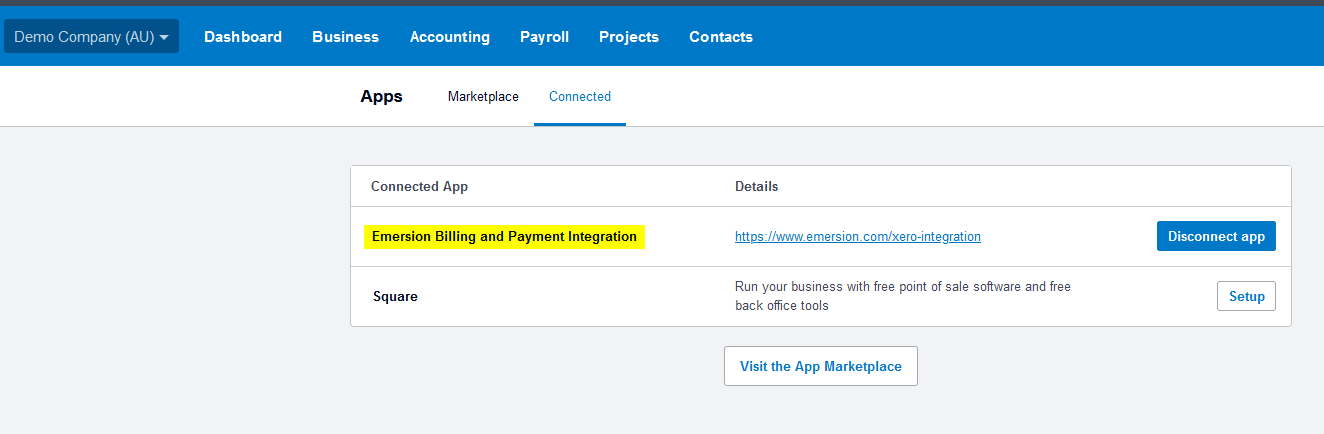
If you still require a connection between Emersion and Xero, you will be required to re-connect by utilising the Connect to Xero button via Admin > Xero
Automatic Action
Our system
proactivelypro-actively monitors all Xero connections. If 5 errors in an hour are detected, the system will automatically set the Xero configuration to disabled and create a support ticket for the Emersion Customer Service team to follow up with you. This is done to avoid our system making unnecessary attempts to call the Xero platform for connections that are expired or closed.
Solution
Service providers can not reactivate their own Xero Configuration if it has been marked Inactive in Emersion. Please create a support ticket for the Emersion Customer Support team to help you.
Related articles
| Content by Label | ||||||
|---|---|---|---|---|---|---|
|