Overview
This bulk tool is a mapping tool and associates Xero Contact GUIDs with the relevant Emersion accounts.
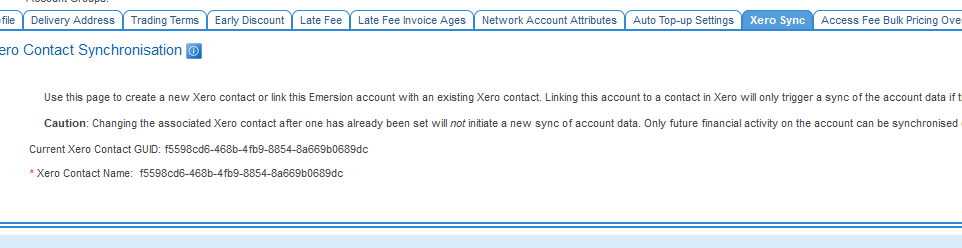
Xero Contact mapping done in this way currently does not display a friendly Contact name - only a GUID.
|
Licensing
This feature is available to subscribers of the following: Tick the option(s) that apply. If this is available to Core users, meaning everyone, other options should not be ticked
- Emersion Core
- Optional Modules (Xero)
- Upon Request (please contact your Account Manager)
Import Result Notification
This feature utilises the Bulk upload processing notification event (event type 963) to send a notification to the user containing the results of the import attempt.
- If the import is successful, the email notification will advise you when the import process is complete.
- If the import is not successful, the email notification will send details of the records that failed validation and why.
An event template must be created and the event must be enabled before the import tool can be used.
Preparing The Data for Import
To prepare your data for import, you will need to create a CSV import file or you can download the import file below. You will need to extract the csv file and save it.
A hard limit of 2000 rows is supported via this tool, including the header row.
If you need to import more than this, create multiple import files and process them one-by-one.
Download the xero account mapping import template Create a CSV template for users and upload it here so users can download it
Importing The Data
To access the import tool:
Admin > Bulk Import > Xero Account Mapping replace with full navigation path
- Click the Browse button and select the csv file containing the data you want to import.
- If you want the bulk upload processing notification email to be sent to a different email address than the address defined in the event template, tick the Override? checkbox and enter an alternative email address. This will only apply for this upload. To change the email address for all future imports, you will need to change the recipient defined in the event template.
- Press Submit
- The system will validate the data and if no errors are found, the system will import the data. When the notification email is received, the process has been completed.
Validating the Import
The system will parse the data for invalid formatting only. It cannot check for data accuracy. It is strongly recommended that you check the imported data to ensure that the import was accurately imported. To do this, divide your import records into groups of 20. Check a single record in each group. If an error is found, check each previous record for the group until you find the one that was imported incorrectly. |
If you find an problem, you cannot roll back the import. You have two options should this occur:
- Manually correct the data.
- Request Emersion fix the errors for you.
Any request to correct imported data must be submitted via a ticket. Emersion will provide an estimate of the work and a quote. The quote must be approved and paid in advance before any restorative work commences.
Data Definition
This section contains a list of the required fields and a definition of what the system considers as valid inputs.
| Data field | Description | Mandatory? | |
|---|---|---|---|
| account_id | The Emersion Account ID | Yes | |
| contact_guid | The corresponding Xero Contact GUID.
| Yes | |
| replace_if_exists | If the Xero GUID in this file is different to the one currently saved against the Emersion account, this flag is required to overwrite the existing record with the new GUID. If set, it will save the new Xero Contact GUID. The valid entries are:
| No |
Viewing Imported Data
After importing data it is important to validate it was imported correctly. Choosing a random records and performing a visual check in Cumulus should reveal any mistakes relatively quickly that would be harder to see in an import sheet.
Tell the user here exactly where to go in Cumulus to see the imported data. An example from the Notes Import is provided below. Replace this example with a relevant one for the import or update tool you are documenting
Xero Contacts can be found via Admin > Xero > Contacts tab.
Access Control
The following powers are used to govern access to this tool
- Bulk Update: Xero Contact GUID to Emersion Account