Overview
This article covers how to create a payment batch using the Manual Payment Batch module.
Prerequisites
Before a batch can be created, both the service provider requirements and the customer requirements must be met. These requirements are documented in this article.
Create a Payment Batch
The first step to exporting the payments due is to create a batch in the system. The batch serves as a 'container' to return a list of customer payments that are due that day. Once the batch has been created the individual payments returned in the batch can then be selected or omitted for export to a bank-compliant file.
To create a Manual Payment Batch:
Finance > Manual Payment Batch
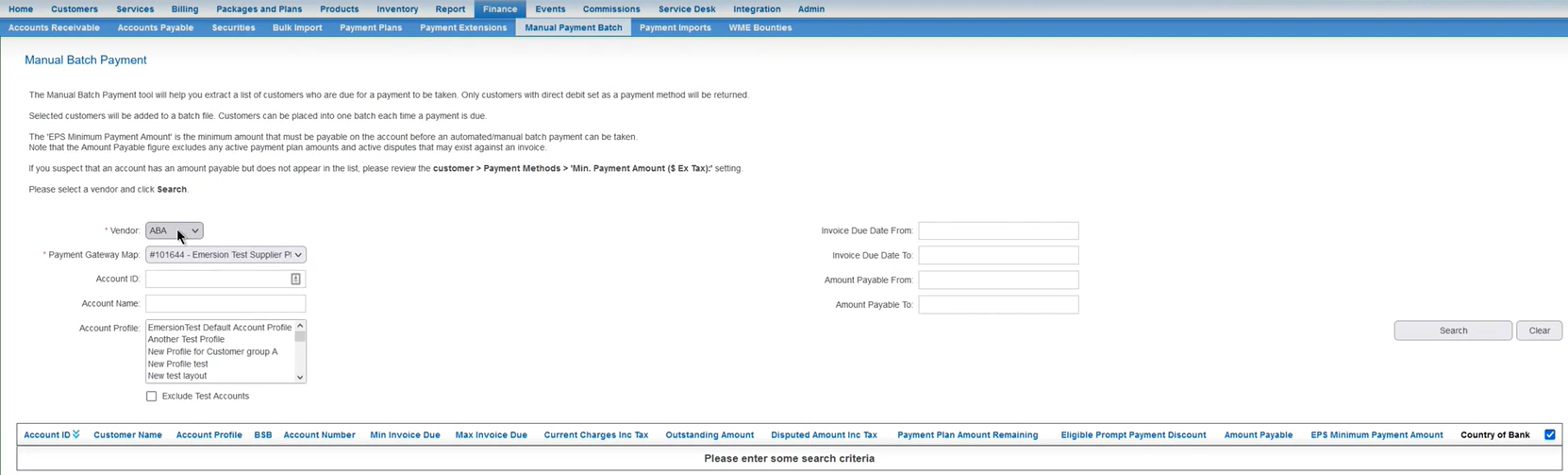
Click the Create New button. The user will be taken to the screen to generate the batch file.
If a supported payment gateway has not been configured, the user will be presented with an error. While you have access to the Manual Payment Batch feature, your account does not have an appropriate payment gateway configured. If you feel this is incorrect, please contact Emersion. |
Select a bank vendor from the options available in the list.
If the service provider is configured to direct payment traffic through Multiple Payment Gateways, then an additional field will be available:
- Payment Gateway Map: Select the Payment Gateway Map to process this batch with. Only customers who are linked to this Payment Gateway Map will be shown in the list below.
By default, the Manual Payment Batch screen looks only at invoices for eligible accounts that either due or overdue. This implicitly means that invoices where the due dates are in the future are excluded. Use Invoice Due Date From and Invoice Due Date To fields to ignore this rule. The page will then show any accounts that contain invoices due for payment between those dates. These fields also allow searching for invoices where the invoice due date is in the future.
Press the Search button.
- If no customers are due to make a payment, or any of the other customer requirements have not been met, no results will be returned in the search.
Customers who owe a payment will be returned in the list as shown.

In the right-hand column and if applicable, remove the tick against anyone for whom a payment should not be taken. If everyone in this list will have a payment taken, ensure the box in the table's header row is ticked.
Press Submit to generate the batch. The batch will be created in an Open status.
The next step is to export the payments.