Overview
When synchronising Companies from ConnectWise to Emersion, service providers can choose to synchronise all companies or just some, based on the company type.
This article guides users to setting up:
- which ConnectWise company types should be synchronised when accounts are created in Emersion.
- The Emersion account type and account profile to assign when the new Emersion company.
Business Rules
The account profile must exist in Emersion before it will appear in the list.
In some situations, if a mapping does not exist then the item will be skipped If company type mappings are not present when the sync is enabled, the objects will not sync to the destination. |
Synchronisation Support
This mapping is only used when the integration is configured to Pull Companies and Contacts data.
For service providers who are syncing in the other direction, the chosen company type field on the Companies and Contacts settings page (under the Push: Emersion → ConnectWise section) is always used.
Mapping Company Types
To access the company types mapping page, go to Integration > ConnectWise > Mappings > Company Types
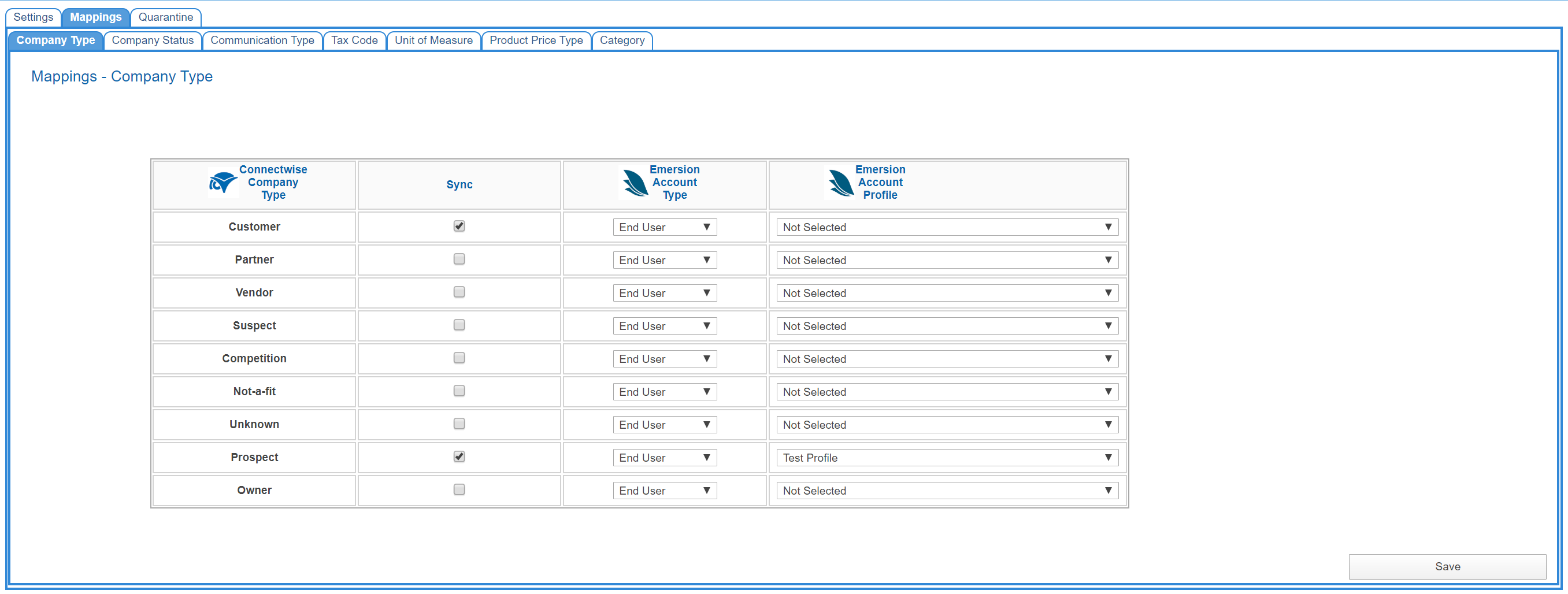
For each ConnectWise Company type:
- include it in the sync schedule by ticking the check box flag.
- select the Emersion account type that it will create
- select the Emersion account profile that the new account will be assigned.
When you are finished, press Save.