This notice is to advise that Emersion are implementing a number of important changes to the invoice templates and the End User Portal user interface in relation to payment information, specifically, payment dates.
Based on feedback from our customers, there has been confusion over how payment dates are represented.
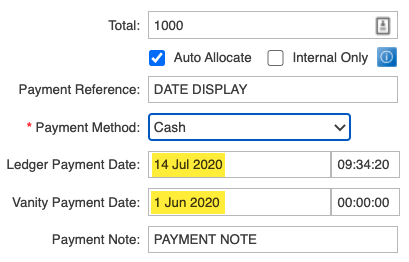
There is a distinction that needs to be made between:
This is a picture of the fields when collecting a payment.
Currently, the invoice is displaying the ledger payment date but the End User Portal is displaying the vanity payment date.
To ensure the end customer is not confused when it takes some time from payment receipt to entering into Emersion, a number of changes are required.
The display of the the ledger payment date and the vanity payment date on invoices and the End User Portal.
No changes have been made to Cumulus.
This picture below is the present view of the Transaction History grid on the invoice.
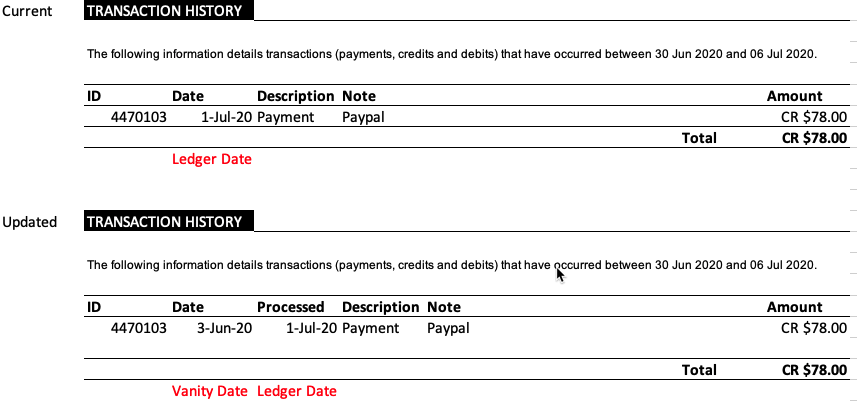
We will implement the following changes.
Grid Columns | ||||||
|---|---|---|---|---|---|---|
Before Change | ID | Date (Ledger Date) | Description | Note | Amount | |
After Change | ID | Date (Vanity Payment Date) | Processed Date (Ledger Date) | Description | Note | Amount |
This picture below is the present view of the Payments page on the End User Portal.

We will implement the following changes.
Grid Columns | ||||||||
|---|---|---|---|---|---|---|---|---|
Before Change | Payment ID | Payment Type | Payment Subtype | Transaction Date (Vanity Date) | Payment Amount | Payment Status | Payment Reference | |
After Change | Payment ID | Payment Type | Payment Subtype | Date (Vanity Date) | Processed Date (Ledger Date) | Payment Amount | Payment Status | Payment Reference |
These changes will come into effect from Monday 3rd August 2020.
Nothing. The changes will be seamless and there is no action for users.