Overview
If you wish to exclude customers from being subject to any automatic suspension or restriction activity due to non-payment, there are two ways to do this in Cumulus.
- Exclude a single customer
- Exclude a group of customers
Exclude a Single Customer
If you wish to exclude a single customer, search for the customer you want to omit from auto-suspension and open the customer record.
From the Customer Screen:
- Click the Details tab.
- Click the Edit Account Summary button to open the screen in edit mode.
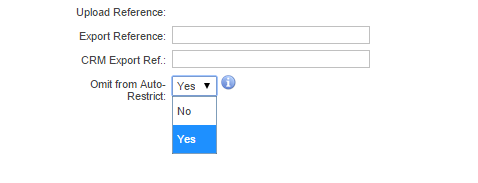
- Change the Omit From Auto-Restrict setting to Yes.
- Save the changes.
Exclude a Group of Customers
To exclude a group of customers from being subject to any Auto-restriction activity due to non payment, you can use the Account Groups for this purpose. By grouping customers into an Account group, then configuring the Account Group correctly, you can ensure any customer that is added to the Account Group will not be suspended or have services restricted for non-payment.
This will only work on account groups that distribution lists.
Navigate: Admin > Settings > Automated Suspension
- Select the automated suspension rule you wish to change. The page to configure the business rules will appear.
- Under the Excluded Account Groups section, select an account group from the list of Available Account Groups. CTRL + CLICK will allow you to select multiple groups if you wish to add more than one group.
- Enter an optional exclusion reason if you want to enter a reason for excluding the group.
- Once you have the groups selected, click the Exclude Account Group button.
Account groups that are excluded from the business rule set for auto-suspension will be listed in the table.
Remove an account group from the exclusions list at any time by clicking the Remove from exclusions list link.